
How to Create Consistent Characters in AI Video
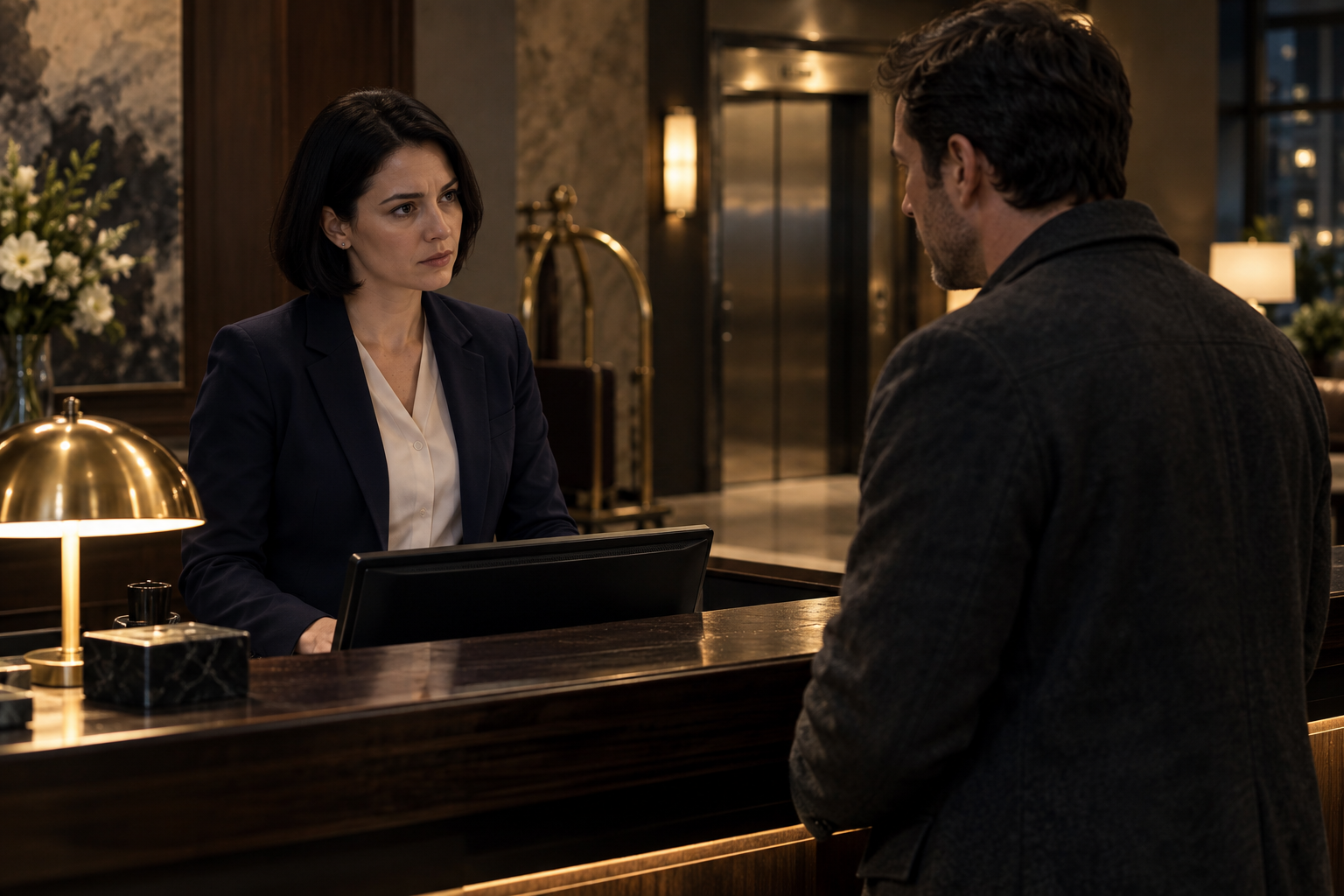
To create consistent characters in AI video, establish one approved character design, reuse it wherever reference inputs are supported, and generate short shots with controlled changes. Keep the wardrobe, location, voice, and lighting stable before attempting complex action. A detailed prompt helps, but it cannot replace a reliable reference and a continuity check.
For a short-drama series, this matters more than a spectacular opening shot. If the lead looks different halfway through an argument, viewers have to work out who they are watching instead of following the story.
Here is the workflow I recommend for building a vertical episode around characters you can actually reuse.
What character consistency really means
A consistent character is more than a recognizable face. Viewers also track hair, body proportions, clothing, posture, vocal delivery, and relationships to the space around them.
Think of consistency as four separate checks:
- Identity: Does this look like the same person?
- Continuity: Are clothes, props, and physical details correct for this moment?
- Performance: Does the character move and speak in a believable, coherent way?
- Scene geography: Are they still standing in the right place, facing the right person?
A shot can pass the first check and fail the others. Your lead might retain her face but suddenly hold a phone in the opposite hand. That is a continuity problem, not necessarily an identity problem.
Separating these checks makes revisions much more precise.
Start with a scene small enough to control
Before producing a ten-episode series, build one scene with two characters, one location, and one emotional turn.
For example: Maya, a hotel receptionist, discovers that her brother Leo checked into a room under a false name. She confronts him at the reception desk. He notices the security camera and refuses to answer.
That premise gives you conflict without requiring crowds, vehicles, costume changes, or elaborate movement.
For a first test, aim for a 35–50-second scene in a 9:16 frame. Those are planning targets, not guarantees about model output length. You will assemble the final scene from shorter clips.
In Dizi Fabrikası, the useful starting point is its fixed-character and fixed-location workflow. Establish the recurring cast and set before generating episode coverage. Avoid treating every shot as an unrelated text-to-video request.
How to create consistent characters in AI video
1. Write a compact character specification
Give each character a short, stable description. Separate permanent identity from details that can change between scenes.
For Maya, that might look like this:
Permanent identity: Adult woman, approximately 30, oval face, dark brown eyes, straight black bob ending at the jaw, average build.
Scene wardrobe: Navy receptionist blazer, cream blouse, small silver stud earrings, no necklace.
Performance baseline: Upright posture, restrained gestures, direct eye contact when asking a question.
Avoid relying on vague labels such as “beautiful,” “cinematic,” or “mysterious.” They say little about which features must stay fixed.
Also resist describing every possible facial detail. A specification should be easy to reuse and audit. If two descriptions contradict each other, resolve the contradiction before generating anything.
2. Approve reference images before video
Choose a reference where the face is clear, the lighting is readable, and neither hair nor a hand obscures important features.
Where your selected workflow supports multiple references, prepare a front view, a three-quarter view, and a wider wardrobe reference. Check that these images actually depict the same person. Three inconsistent references do not become consistent merely because they share a character name.
Keep an approved version separate from experiments. A simple naming system helps:
maya_identity_v1maya_reception_wardrobe_v1hotel_reception_night_v1
If you later change Maya’s haircut, treat that as a deliberate version change rather than quietly replacing her reference halfway through production.
3. Lock the location and its visual anchors
Character continuity becomes harder when the surrounding scene changes unpredictably.
Define the reception area with a few visible anchors: a dark wooden desk, a brass lamp on the desk’s left side, an elevator behind Leo, and warm overhead lighting.
Then decide where everyone stands. Maya stays behind the desk. Leo faces her from the lobby. The security camera sits above and behind Maya.
These details give reaction shots a shared geography. They also prevent a common problem: a reverse angle that appears to take place in a completely different hotel.
For vertical framing, keep important anchors close enough to the actors to remain visible. A beautifully designed wide room is not useful if its identifying features disappear outside the crop.
4. Turn the script into simple shots
Write the emotional beat first, then divide it into visible actions. Do not ask one generation to deliver an entire dramatic scene.
A workable plan for the hotel confrontation is:
| Shot | Action | Planned edit length |
|---|---|---|
| 1 | Maya sees Leo’s name on the booking screen | 4 seconds |
| 2 | Leo waits beside the desk | 5 seconds |
| 3 | Maya asks why he used a false name | 8 seconds |
| 4 | Leo glances toward the security camera | 4 seconds |
| 5 | Maya notices his hesitation | 5 seconds |
| 6 | Leo says, “Not here” | 4 seconds |
| 7 | Maya reaches for the room key | 6 seconds |
These timings describe the edit, not mandatory generation settings. Allow room for pauses and select usable portions of each clip.
The key is one primary action per shot. Turning, walking, picking up a prop, and delivering dialogue in one continuous take creates more opportunities for visible errors.
5. Keep identity wording stable; change the action
Use a repeatable prompt structure:
Character reference + wardrobe + location + framing + single action + lighting + continuity constraints.
For example:
Use the approved Maya reference. Maya wears her navy receptionist blazer and cream blouse, with silver stud earrings. Behind the dark wooden hotel desk at night, she looks up from the booking screen toward Leo. Medium close-up, restrained expression, warm overhead light, stationary camera. Preserve her jaw-length black bob and established facial features. No additional people.
For the next shot, change only what the scene requires. Rewriting her entire description with new adjectives can introduce unnecessary variation.
Reference support, camera control, and prompt adherence differ across Wan, Kling, and MiniMax models and versions. Dizi Fabrikası offers these video-model options, but do not assume every option exposes identical controls. Test a close-up and a simple movement shot before committing to the full scene.
6. Cast the voice before finalizing dialogue coverage
A changing voice can break character identity as quickly as a changing face.
Choose one voice per recurring character and keep a pronunciation note for names and unusual words. With ElevenLabs dubbing in the workflow, maintain a consistent voice choice while directing each line’s emotion separately.
For Maya, “Why did you use another name?” should sound controlled, not automatically shouted because the scene is a confrontation.
Generate or approve the dialogue audio before locking the edit. Natural delivery may take longer than the script suggests. Leave breathing room rather than stretching a short facial performance across an unnaturally long line.
Dubbing alone does not guarantee accurate lip synchronization. Inspect speaking shots closely, and use reaction shots or cutaways where appropriate—not as a substitute for fixing every obvious mismatch.
7. Review continuity in the timeline
Place the shots together before judging the scene. A clip that looks convincing alone may clash sharply with its neighbor.
In Dizi Fabrikası’s premium timeline editor, use the assembled sequence to check faces, wardrobe, screen direction, props, voice transitions, and pacing.
Review once without sound, then listen without watching. The silent pass exposes visual drift. The audio-only pass reveals inconsistent delivery and awkward pauses.
When one shot fails, revise that shot’s action, framing, or inputs. Avoid rebuilding an otherwise usable scene unless the underlying references are wrong.
Budget for tests, not just finished seconds
AI video production includes rejected takes. Your first test scene should reveal which shots are dependable and which consume repeated attempts.
Track attempts by shot type. If a moving two-person shot repeatedly fails while separate close-ups work, change the coverage rather than indefinitely regenerating the same request.
Check current pricing before planning a batch of episodes. Base your budget on your own test results, not an assumed cost per finished minute.
Browse the community showcase for framing and storytelling ideas, while remembering that a finished example does not show every discarded take. When your character references and test script are ready, start your series with one complete scene before expanding production.
FAQ
Can text prompts alone keep an AI character consistent?
They can help, particularly in simple shots, but they are not a dependable identity lock. Reusable visual references, stable descriptions, controlled framing, and manual review provide a stronger workflow. Expect occasional failures even with those precautions.
Which AI video model is best for consistent characters?
There is no universal winner across every scene and model version. Test your actual reference on the shots you need: close-up dialogue, profile, movement, and interaction. Choose based on usable continuity, not just the most attractive isolated output.
How do I keep the same character across multiple episodes?
Maintain an approved character package containing identity references, wardrobe versions, voice choice, pronunciation notes, and performance guidance. Reuse established locations where the story allows. Before producing each episode, record intentional changes so a new outfit or injury is not mistaken for an error.
Make your own AI series
Fixed characters, fixed locations, consistent voices and a pro editor in one studio.
Start creatingKeep reading
- How to Create an AI Short Drama Series
Learn how to create an AI short drama series, from a three-episode script to consistent scenes, voice dubbing, vertical editing, and a finished pilot.